Together, Autani and Keilton form one light management system: Bluetooth Mesh across the floor, gateways to hold it together and the EnergyCenter software at the centre. From a single room to several sites.
Keilton supplies the Bluetooth layer: sensors, luminaire controllers, switches and time modules that join into zones over a radio network. Autani supplies the layer above: gateways, the manager and the EnergyCenter software for monitoring, analysis and building services.
In the documentation the combination appears as Keilton+autani. In practice that means you can start small and extend later without replacing what is already installed.
New build and retrofit
Without extra control wiring.
Because the components communicate by radio, there is no control cabling between the luminaires. That is exactly what makes the technology attractive in existing buildings, where running an additional cable would take considerable effort.
When retrofitting to LED it is therefore worth thinking about the control system at the same time, not just the luminaires. That second step is never cheaper than at this moment.
Experience the sensors
Light only where where someone is.
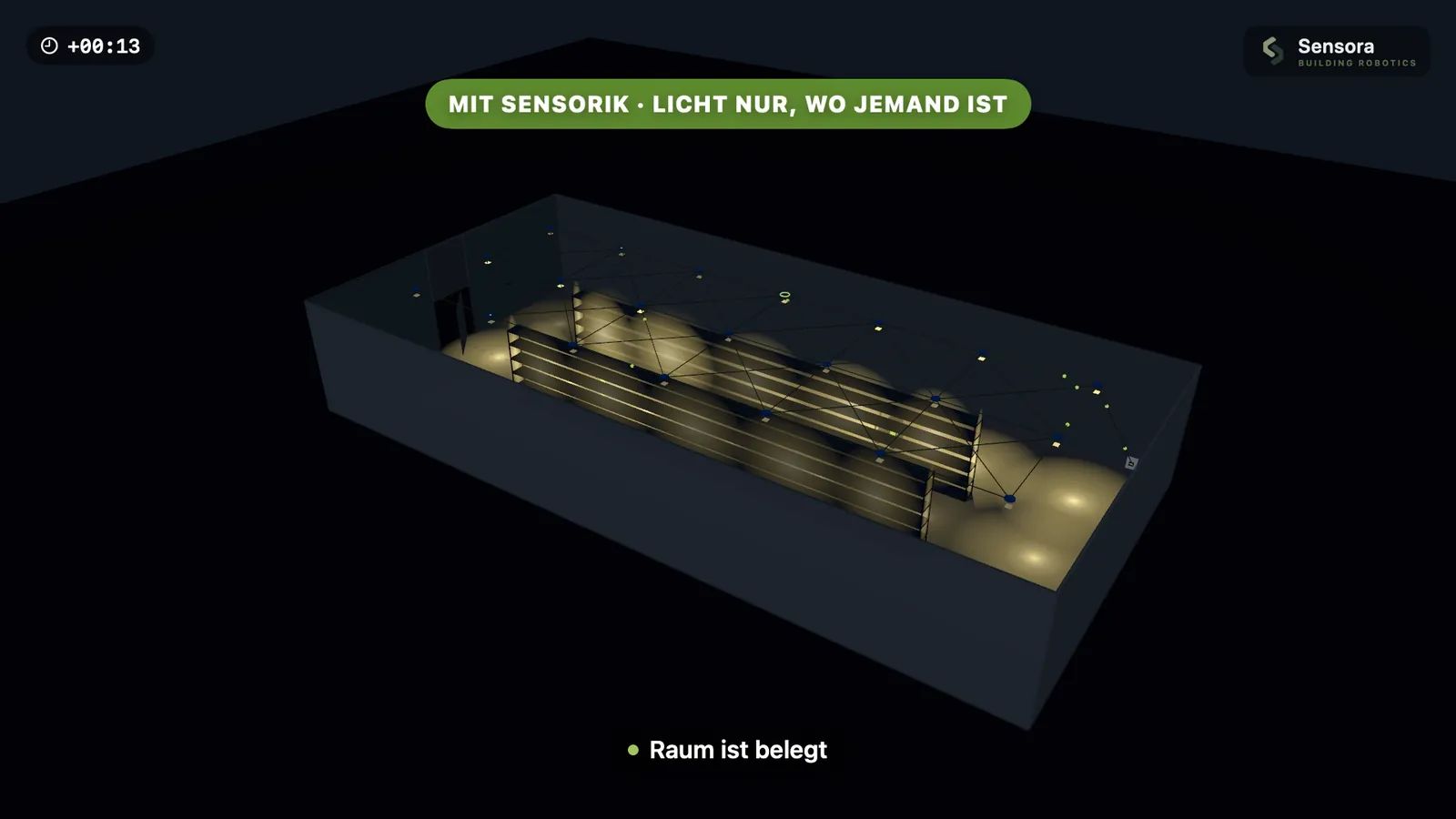
A person walks down the racking aisle, then a forklift drives past. Sensors switch on only the nearby luminaires.
Sensors
Base light
Colour temperature
Luminaires on
– / 8
Energy compared with permanent light
–
Currently detected
–
Dashed: the detection area of one sensor. The luminaire switches on as soon as someone is inside it and stays on briefly afterwards (run-on time). An illustration, not a measurement. The actual saving depends on usage, run-on time and base light.
System architecture
From the luminaire to the whole site.
Luminaire level.
A sensor detects occupancy and daylight, and a controller inside the luminaire acts on it. Every luminaire becomes individually adjustable – the finest level of control, known as LLLC.
The devices in an area form a radio network in which every node passes signals on. A zone holds around 100 nodes. It is set up in the app: create groups, store scenes, set hold-on times.
A gateway connects the zone to the Autani platform. A real-time clock keeps every device in step so that schedules run identically everywhere – outdoors also astronomically, by sunrise and sunset. A dongle additionally records consumption.
The Autani Manager brings lighting, sensor data, metering and further building services together. It is operated through a web interface, graphically on the floor plan. System events are kept for more than a year and can be analysed.
PIR sensors respond to moving heat, microwave sensors to movement in the room, dual-tech sensors combine both with ultrasound. For great heights a dedicated algorithm makes sure detection still works reliably from twenty metres without false triggers.
Use daylight.
The light sensor measures how bright it actually is at that spot and dims the artificial light accordingly. In halls with roof lights and in offices near windows, this is the quietest and most effective saving across the day.
Run schedules.
Shift start, shutdown, weekend: a real-time clock in the zone makes sure every device knows the same time – even after a power cut, thanks to an internal battery.
Measure consumption.
The energy dongle records a log every 15 minutes. That becomes usage reports showing where how much is consumed – the basis for adjusting rather than guessing.
Create zones.
Rack aisle, hall bay, office wing, outdoor area: every group gets its own rule. Changes are made in the app or at the central controller, not in the switch cabinet.
Step in by hand.
A battery-powered wall switch with scene buttons can be mounted wherever it is needed – later on and without any cabling.
Autani EnergyCenter
More than light on one interface.
The EnergyCenter software runs on the Autani Manager and processes data from sensors, local controls and meters in real time. From sensor events, schedules and triggers it manages the lighting and, depending on the build-out, further building services such as heating, ventilation and air conditioning.
The manager connects over Ethernet to the local network or a mobile router. Several protocols are supported: Bluetooth, Zigbee under the name autaniNet, EnOcean and BACnet/IP. This lets the lighting control become part of a wider building automation system.
Room to grow
One room today. A campus later.
The smallest sensible stage is a single zone with sensors and controllers, set up through the app. That is enough for one area, one hall or one floor – and it works without a central controller.
As the task grows, gateway and manager are added. The sensors and controllers already installed stay where they are. This scalability is the real advantage over a rigid single-room solution.
Applications
Where we put this to work.
Industrial and production halls
Warehouses and logistics centres
Office and administrative buildings
Retail and sales floors
Sports halls and sports facilities
Food production areas
Multi-storey and underground car parks
Outdoor lighting and company premises
Workshops and ancillary rooms
Other commercial and public buildings
Components
Fourteen building blocks. Each with a datasheet.
High bay sensors up to 22 metres, sensors for office luminaires, battery-powered detectors and switches, luminaire controllers, gateways, time modules and the central controller. All technical data and datasheets are in the overview.
Light management means the lighting does not burn at full output all the time but responds automatically to how a space is actually used. Sensors detect occupancy and daylight, and a control system then switches and dims individual luminaires or whole areas.
What does LLLC stand for?
LLLC stands for Luminaire Level Lighting Control. Every luminaire has its own sensor and controller and is regulated individually, instead of a whole group being switched together.
What is Bluetooth Mesh?
Bluetooth Mesh is a radio network in which every device relays the signals of the others. The network therefore reaches further than a single radio link, and no additional control cable is needed between the luminaires.
Can sensors be retrofitted?
Yes. Because the components communicate by radio, the control system needs no additional cabling. That makes retrofitting existing buildings considerably easier than with wired systems. Battery-powered sensors and switches need no cable at all.
How much extra electricity do sensors save?
That depends on use: the more irregularly an area is used, the greater the effect. The potential is highest in rack aisles, ancillary rooms and car parks, and lowest in production areas that are staffed continuously. A reliable figure only emerges from the operating hours of your own installation.
Does this work with existing luminaires?
That depends on the luminaire. It needs a dimmable driver with a suitable interface, for example 0–10 V or DALI. Our series are designed sensor-ready. For third-party luminaires we check case by case.
Who plans and commissions the system?
Choosing the components and dividing the site into zones is part of the lighting design. TRiALED supports selection, planning and commissioning; the exact scope is agreed for your project.